Securing Windows Access: How Boundary and Vault Eliminate Static Credential Risks
Managing remote access to Windows environments remains a persistent challenge for many organizations. Despite advancements in security tools, static credentials—like shared local administrator accounts, long-lived domain accounts, and service accounts with fixed passwords—are still widely used. These credentials often go unrotated for months, increasing the risk of exposure. Additionally, traditional VPNs grant broad network access, making it difficult to restrict lateral movement and leaving security teams struggling with IP-based controls. This article explores how HashiCorp Boundary and Vault work together to address these issues by shifting from static credentials and network-level access to identity-based, dynamic credential management with granular authorization.
Why are static credentials still a major security risk in Windows environments?
Static credentials—such as shared local admin passwords, long-lived domain accounts, and service accounts with unchanging passwords—are deeply embedded in many Windows environments. They are often used for Remote Desktop Protocol (RDP) access, troubleshooting, and emergency break-glass scenarios. Because manual rotation is cumbersome, these credentials can remain valid for months or even years, making them prime targets for attackers. Even when multi-factor authentication (MFA) is used, the underlying static credential can be reused across sessions, undermining security. Shared administrative accounts compound the problem, as multiple users may know the same password, leaving a wide attack surface. This risk concerns CISOs, DevOps, and security teams alike.
How do traditional VPNs fall short in controlling access?
VPNs follow a 'castle and moat' model: they secure the network perimeter but grant overly broad access once inside. After users connect, restricting lateral movement becomes complex and relies on firewalls, security groups, or network segmentation—all based on IP addresses rather than user identity. In modern cloud environments, IPs are dynamic and ephemeral, making IP-based rules brittle and hard to maintain. Additionally, deploying extra tools to refine access leads to operational sprawl. While VPNs solve connectivity, they fail to provide fine-grained, identity-based access control at the user-to-resource level, leaving organizations exposed to credential theft and lateral movement.
What is Boundary and how does it address credential exposure?
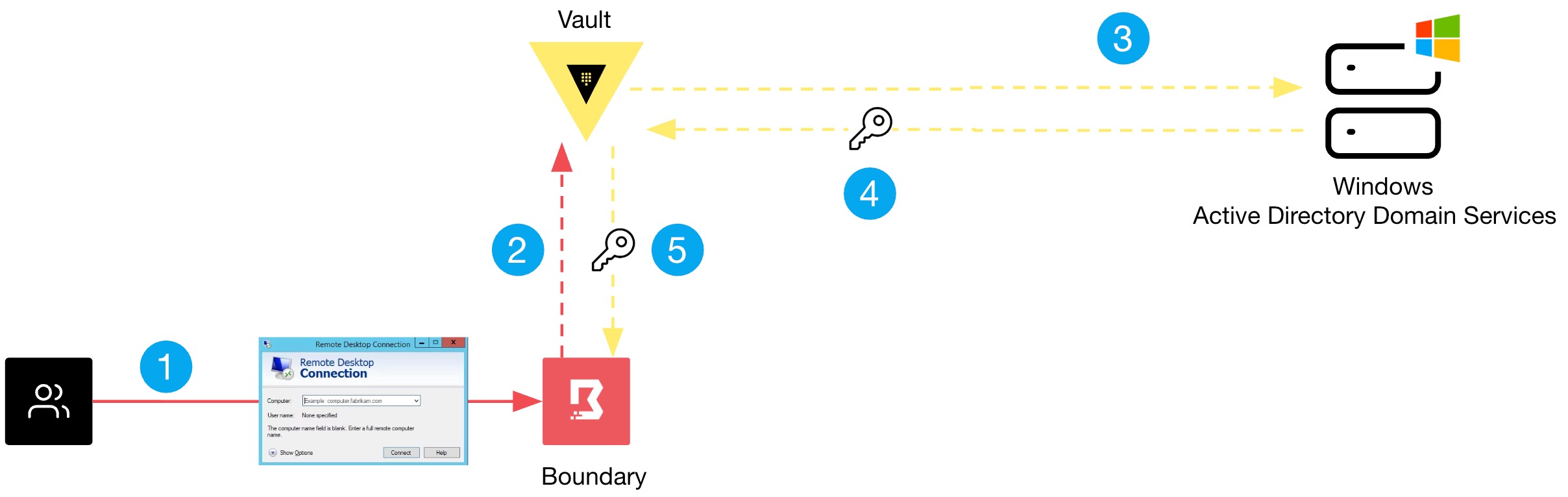
HashiCorp Boundary is a platform that fundamentally rethinks remote access by combining authentication and authorization into a single system. Instead of granting broad network access, Boundary establishes direct, encrypted sessions between a user and a target resource based on the user’s identity and associated policies. This eliminates the need to expose internal IPs or rely on static credentials. Boundary also manages credentials on the user's behalf, integrating with Vault to dynamically generate and rotate secrets. Users never see or handle the actual password or key, significantly reducing the risk of credential exposure.
How does Boundary improve access control compared to VPNs?
Boundary shifts access from a network-layer model to an identity-layer model. Instead of giving a user full network access via VPN and then trying to restrict by IP, Boundary grants session-level access to specific resources (e.g., a particular Windows server) based on the user’s role and session context. Policies are defined around user identities and resource tags, not IP addresses. This makes access control granular, scalable, and adaptive to dynamic environments. Sessions are encrypted end-to-end, and just-in-time credentials are issued, reducing the attack surface. Administrators gain visibility into who accessed what and when, with audit logs.
How does Vault integrate with Boundary for secrets management?
Boundary natively integrates with HashiCorp Vault to provide dynamic secrets for target resources. When a user requests a session to a Windows machine, Boundary communicates with Vault to generate a temporary, time-limited credential (e.g., a one-time password or SSH key). This credential is injected into the session without the user ever seeing it. After the session ends, Vault automatically rotates or revokes the credential. This eliminates the need for static credentials and ensures that each session uses unique, ephemeral secrets. The integration also supports credential brokering for services like Active Directory, enabling seamless and secure access.
What are the key configuration steps to test Boundary and Vault for Windows environments?
To test Boundary and Vault for Windows access, start by deploying Vault and configuring a secrets engine for Windows—typically using the Active Directory or SSH engine. Set up Boundary controllers and workers, then define target resources (e.g., Windows servers) with associated host sets and catalogs. Create roles and attach grant scopes with appropriate permissions. Finally, configure credential stores pointing to Vault and link them to targets. Users authenticate to Boundary via OIDC or local users, then request sessions. For a detailed walkthrough, see the official HashiCorp documentation. The original blog also includes step-by-step configuration snippets for a quick start.