How Meta Fortifies End-to-End Encrypted Backups: A Technical Walkthrough
Introduction
Meta has taken significant steps to strengthen end-to-end encrypted backups for WhatsApp and Messenger, ensuring that your message history remains private even from Meta itself. At the core of this system is the HSM-based Backup Key Vault—a distributed, tamper-resistant infrastructure that stores recovery codes securely. This guide walks you through the key components of Meta’s approach, including the vault architecture, over-the-air fleet key distribution, and transparent fleet deployment. By the end, you’ll understand how Meta protects your backups and how you can verify the system’s integrity.
What You Need
- Basic understanding of end-to-end encryption concepts
- Access to the Meta Engineering blog or whitepaper (linked in steps)
- A WhatsApp or Messenger account (optional, for practical verification)
- Familiarity with hardware security modules (HSMs) and cloud infrastructure
Step 1: Understand the HSM-based Backup Key Vault
What it is: The Backup Key Vault is a geographically distributed fleet of hardware security modules (HSMs) that stores your recovery code—the key needed to restore your encrypted backup. The code is stored in tamper-resistant HSMs, inaccessible to Meta, cloud providers, or any third party.
How it works: The vault uses majority-consensus replication across multiple datacenters. This means that even if one HSM fails or is compromised, the system remains resilient and your recovery code stays safe.
Why it matters: Without this vault, your backup encryption key could be stored on your device only, making recovery risky. Meta’s vault allows you to safely back up and restore your message history without trusting Meta or any other entity.
Step 2: Validate Fleet Public Keys via Over-the-Air Distribution
The challenge: In WhatsApp, fleet public keys are hardcoded into the app. For Messenger, new HSM fleets need to be deployed without requiring an app update. Meta solved this by distributing fleet public keys over the air as part of the HSM response.
How to verify authenticity:
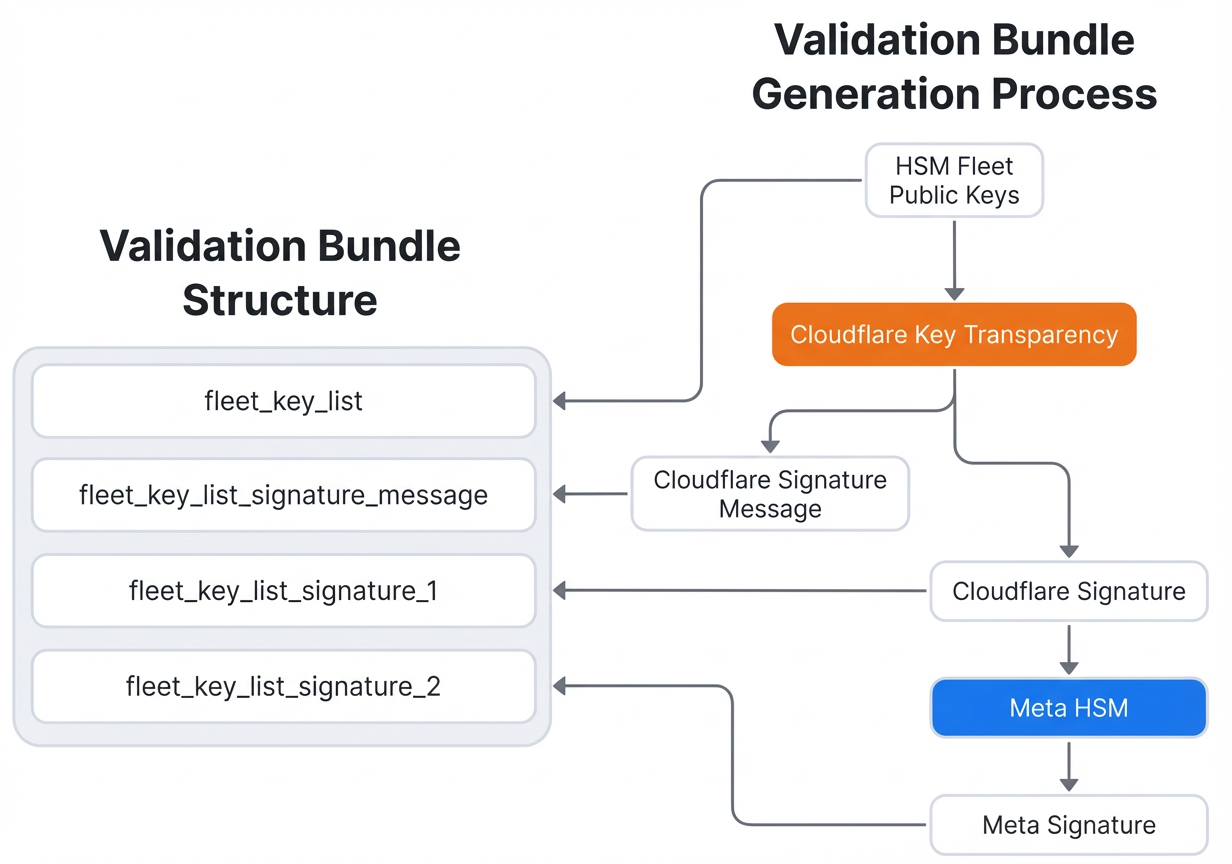
- Obtain the validation bundle: When your Messenger client contacts a new HSM fleet, the response includes a validation bundle containing the fleet’s public key.
- Check the signatures: The bundle is signed by Cloudflare and counter-signed by Meta. This provides independent cryptographic proof that the key is authentic.
- Consult Cloudflare’s audit log: Cloudflare maintains a log of every validation bundle issued. You can cross-reference the bundle you received against this log to ensure it hasn’t been tampered with.
- Read the full protocol: For a complete technical specification, refer to Meta’s whitepaper, “Security of End-To-End Encrypted Backups”. The validation protocol is described in detail there.
Why this strengthens backups: Over-the-air distribution allows Meta to update HSM fleets quickly and securely, while giving you cryptographic proof that you’re connecting to the legitimate fleet—not an attacker’s impersonation.
Step 3: Verify Transparent Fleet Deployment
Meta’s commitment: To demonstrate that the system operates as designed and that Meta cannot access your encrypted backups, Meta now publishes evidence of secure deployment for each new HSM fleet.
How to verify:
- Check the engineering blog: Meta posts deployment evidence on their official blog page (typically this same article thread). New fleet deployments are infrequent—every few years or so.
- Follow the audit process: The whitepaper includes an Audit section that outlines steps any user can take to independently verify that a new fleet was deployed securely. Steps typically involve checking cryptographic attestations, hardware certificates, and deployment logs.
- Compare against expected values: The published evidence includes checksums, signatures, and hardware measurements that you can compare against what your client receives.
Why transparency matters: By making deployment evidence publicly available, Meta allows anyone (not just security experts) to audit the system and confirm that no backdoors or unauthorized access paths exist. This is a key part of Meta’s leadership in secure encrypted backups.
Tips for Maximum Security
- Enable passkeys: If available, use passkeys instead of passwords for your encrypted backups. Passkeys provide stronger, phishing-resistant authentication and simplify the recovery process.
- Keep your recovery code safe: Write down your recovery code and store it in a secure location (e.g., a password manager or offline safe). Without it, you cannot recover your backup if you lose your device.
- Periodically verify fleets: Even though fleet deployments are rare, you can periodically check Meta’s blog for new evidence. Set a calendar reminder every 6–12 months.
- Understand the limits: End-to-end encrypted backups protect your data from Meta and cloud providers, but they don’t protect against malware on your device. Keep your phone updated and avoid suspicious apps.
- Read the full whitepaper: For a deep dive, read Meta’s whitepaper “Security of End-To-End Encrypted Backups”. It contains all the technical details, including validation protocols and audit instructions.
By following these steps, you can understand and verify how Meta strengthens its end-to-end encrypted backups—helping you trust that your private conversations remain truly private.