Mastering KV-Cache Compression: A Step-by-Step Guide to TurboQuant
Overview
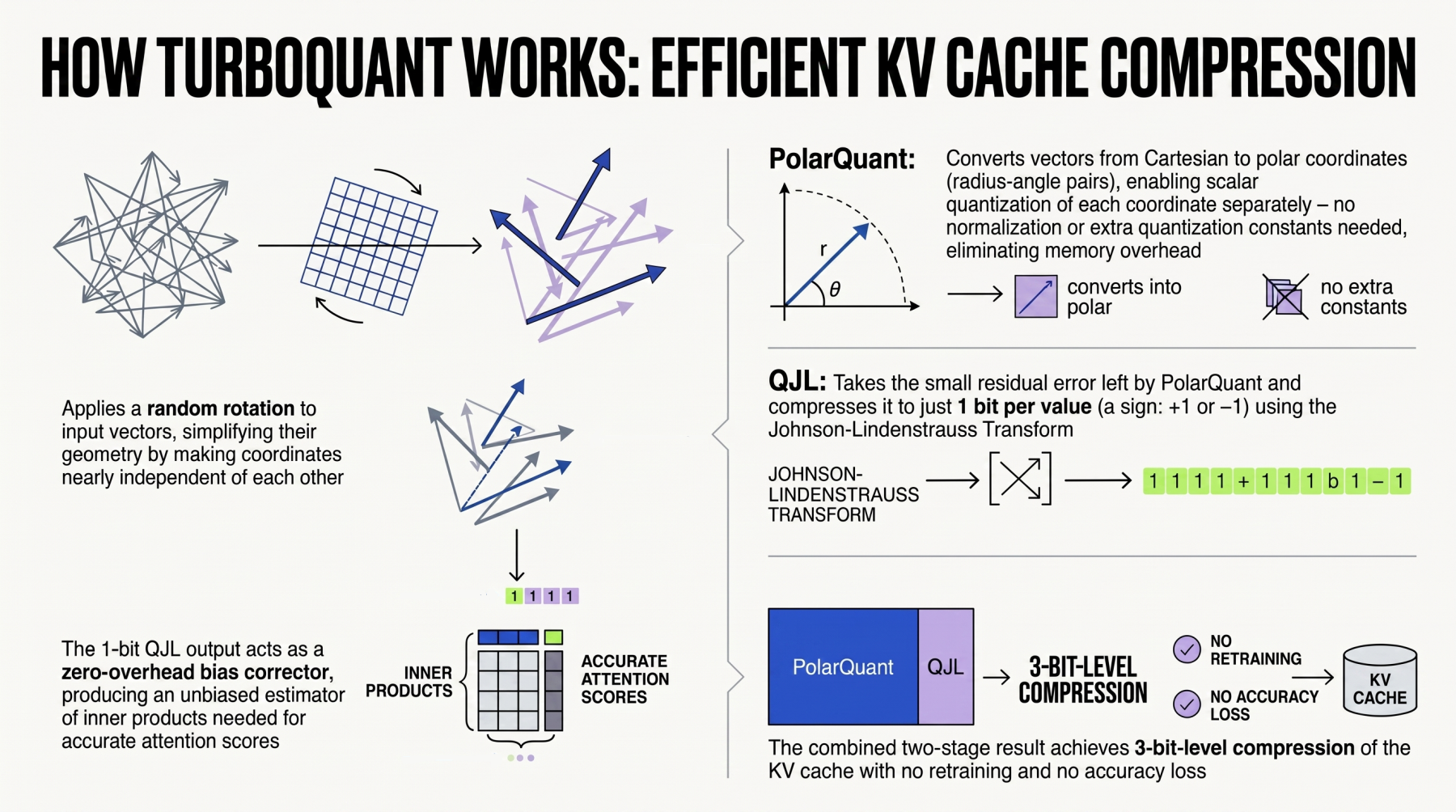
Large language models (LLMs) and retrieval-augmented generation (RAG) systems rely heavily on efficient memory management, especially when dealing with key-value (KV) caches during inference. Google's TurboQuant emerges as a powerful algorithmic suite and library designed to apply advanced quantization and compression techniques specifically to these KV caches, reducing memory footprint and accelerating performance without sacrificing accuracy. This tutorial walks you through the core concepts, setup, and practical application of TurboQuant for compressing KV caches in LLMs and vector search engines, a critical component of modern RAG pipelines.
Prerequisites
Before diving into TurboQuant, ensure your environment meets the following requirements:
- Python 3.8+ installed
- PyTorch 1.13 or newer with CUDA support (for GPU acceleration)
- Basic familiarity with transformer-based LLMs (e.g., GPT, LLaMA) and inference pipelines
- Experience with quantization concepts (e.g., int8, float16) is helpful but not mandatory
- A working RAG system or vector search engine (e.g., Faiss, ScaNN) to test integration
Step-by-Step Instructions
1. Understanding KV-Cache and Why Compression Matters
During autoregressive generation, LLMs store the key and value tensors of previous tokens in a KV-cache to avoid recomputation. This cache grows linearly with sequence length and batch size, quickly consuming hundreds of megabytes to gigabytes of GPU memory. Compressing this cache—using techniques like quantization—reduces memory usage, enabling longer contexts and larger batches. TurboQuant focuses on this exact challenge, providing a suite of algorithms fine-tuned for KV-cache compression.
2. Setting Up TurboQuant
Install TurboQuant via pip (assuming the package is publicly available; adjust if using a local build):
pip install turboquantAlternatively, clone the repository from Google's official source and install in editable mode for development:
git clone https://github.com/google/turboquant.git
cd turboquant
pip install -e .
Verify the installation:
import turboquant as tq
print(tq.__version__)
3. Applying Quantization to KV-Cache Tensors
TurboQuant provides a simple API to quantize the key and value tensors. Below is a basic example using simulated attention projections:
import torch
import turboquant as tq

# Simulate a KV-cache tensor (batch=1, num_heads=8, seq_len=2048, head_dim=128)
key_cache = torch.randn(1, 8, 2048, 128, dtype=torch.float16).cuda()
value_cache = torch.randn(1, 8, 2048, 128, dtype=torch.float16).cuda()

# Quantize to 4-bit with TurboQuant's default configuration
quant_config = tq.QuantizationConfig(
    bit_width=4,
    group_size=32,
    scheme="symmetric"
)

quantized_keys, quantized_values = tq.quantize_kv_cache(
    keys=key_cache,
    values=value_cache,
    config=quant_config
)

# Dequantize for inference (simulating use in attention)
dequant_keys = tq.dequantize(quantized_keys, config=quant_config)
dequant_values = tq.dequantize(quantized_values, config=quant_config)
Note: The actual API may vary—consult the official documentation for exact function signatures.
4. Integrating TurboQuant into an LLM Inference Loop
To apply compression during real inference, you need to modify the attention module to quantize the cache after each forward pass. Here's a high-level integration pattern using PyTorch's torch.no_grad() for efficiency:
class TurboQuantAttention(nn.Module):
    def __init__(self, original_attn, quant_config):
        super().__init__()
        self.attn = original_attn
        self.config = quant_config

    def forward(self, query, key, value, mask=None, past_kv=None):
        # Standard attention computation (simplified)
        q = self.attn.q_proj(query)
        k = self.attn.k_proj(key)
        v = self.attn.v_proj(value)

        if past_kv is not None:
            past_k, past_v = past_kv
            # Dequantize past cache if stored compressed
            if hasattr(past_k, "is_quantized") and past_k.is_quantized:
                past_k = tq.dequantize(past_k, self.config)
                past_v = tq.dequantize(past_v, self.config)
            k = torch.cat([past_k, k], dim=2)
            v = torch.cat([past_v, v], dim=2)

        # Compute attention (not shown)
        output = ...

        # Quantize the updated cache before storing
        quant_k = tq.quantize(k, self.config)
        quant_v = tq.quantize(v, self.config)
        quant_k.is_quantized = True
        quant_v.is_quantized = True

        return output, (quant_k, quant_v)
Replace the original attention module in your LLM with this wrapper:
model.layers[0].self_attn = TurboQuantAttention(
    model.layers[0].self_attn,
    tq.QuantizationConfig(bit_width=4, group_size=32)
)
5. TurboQuant for Vector Search Engines (RAG Systems)
RAG systems often embed retrieved documents into vectors that are stored in a search index. TurboQuant's compression extends to these embedding vectors, reducing memory usage while maintaining retrieval quality. To integrate with Faiss:
import faiss
import numpy as np
from turboquant import QuantizationConfig, quantize, dequantize

# Assume embeddings is a numpy array (num_docs x embedding_dim)
config = QuantizationConfig(bit_width=8, group_size=64, scheme="asymmetric")
compressed_embeddings = quantize(embeddings, config)

# Store compressed embeddings in Faiss index (custom storage)
# ... (see TurboQuant docs for compression-aware index wrappers)

# During query, dequantize on-the-fly
query_vec = ...
decompressed_query = dequantize(quantize(query_vec, config), config)
# Or directly use compressed distance computation if supported
Common Mistakes
- Ignoring group size: Using too large a group size reduces compression benefits; too small increases overhead. Tune based on your model's head dimension.
- Quantizing everything: Only quantize the keys and values, not the entire model weights—TurboQuant is specialized for KV-cache, not model-level quantization.
- Mixing quantization schemes: Ensure consistent scheme (symmetric vs. asymmetric) between quantization and dequantization calls to avoid accuracy loss.
- Forgetting to set
is_quantizedflag: Without this, the attention module might attempt to dequantize already dequantized tensors, causing errors. - Not profile before deployment: Always benchmark accuracy (e.g., perplexity) and latency on your specific model and hardware to validate the trade-offs.
Summary
TurboQuant provides a practical approach to reducing the memory footprint of KV caches in LLMs and embedding vectors in RAG systems through advanced quantization. This guide covered the setup, basic usage, integration into inference loops, and common pitfalls. By applying TurboQuant, you can extend context lengths, increase batch sizes, and lower hardware requirements without compromising model quality—a key step toward more efficient AI deployment.